








Sale Price Check: Are Your "Was" Prices Set Up for AI Shopping Tools?
Description
You find out whether AI shopping tools can get your sale prices. Shopify now sends a product’s “was” price, the crossed-out compare-at price, to AI agents. That happens only when three settings line up. I check all three on your store. You get proof and a list of changes. If you go ahead with a fix, I take the $285 off the fix price.
Who this is for
Maybe you run sales with a “was” price crossed out.
Maybe you are planning a Black Friday sale for Nov 27.
Maybe you sell in Europe as well as at home.
Maybe your “was” price is a maker’s suggested price, not your own past price.
It fits any store that uses compare-at prices.
Why now
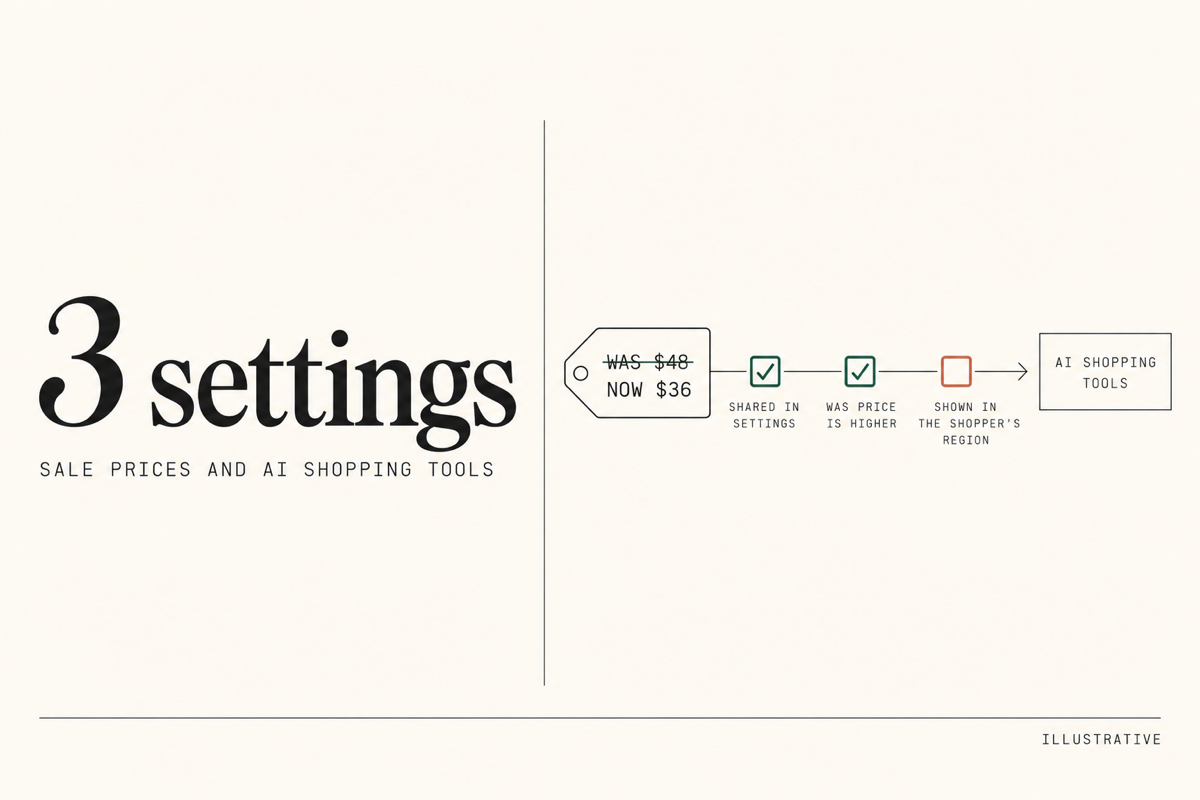
Shopify changed this in October. Shopify sends the “was” price to AI agents only when all three of these are true.
You share “was” prices in your Shopify Catalog settings. This is on by default for most stores. It is off for stores that use the “was” price for a maker’s suggested price or another reference price.
The “was” price is higher than the price for that shopper.
Your store shows “was” prices in that shopper’s region. Stores that hide them from shoppers in the European Economic Area do not send them to those shoppers.
Shopify says changes to these settings take time. So the time to check is before a sale, not during it.
What I check
I test five things in your Shopify admin and on your live store.
The share switch. I read whether your Shopify Catalog settings share “was” prices.
What your “was” price means. On sample products, it may be your own earlier price or a maker’s suggested price. That decides whether the switch belongs on or off.
Prices that do not line up. I look for a “was” price that is the same as the price or lower. Those are not sent.
Regions. I read the regions you sell to and any fixed prices you set for them. Fixed prices replace the “was” price set on the product. I note any region where your “was” prices do not show, Europe included.
The preview. Your Shopify Catalog settings show a preview for each product. I check sample sale products there. Shopify says the preview is a guide, not an exact view of what AI tools show.
What you get
A written report with screenshots for each check. Then a short list of changes, in order, and where each one lives in your admin. Some you can make yourself. For the rest, I give a fixed price. You decide what goes ahead.
What I need from you
Collaborator access to your Shopify admin. You share a four-digit code from your Shopify settings, I send the request, and you approve it.
Your planned sales and the regions you sell to.
Timing
3 business days from when you have paid and I have access, whichever comes last.
What is outside this service
I can check what your store gives Shopify, not how each AI shopping tool shows a price.
Questions people ask
Will this change my store?
No. I read settings and products. I do not change settings, fill a cart or place a test order. The one trace is my collaborator account on your staff list, which you can remove afterwards.
Will my sales go up?
I do not promise a number. Your sales depend on many things I do not control. I promise a clear answer on whether your sale prices are sent, and why not where they are not. If everything is set right, the report shows that too.
What if the fix costs more than $285?
If you go ahead, I take the $285 off the fix price. If you do not, you keep the full report.
'%20style='mix-blend-mode:plus-lighter'%3e%3cpath%20d='M293.421%2055.9546H463.536L701.016%20775.916H55.9546L293.421%2055.9546Z'%20fill='url(%23paint0_linear_0_18)'/%3e%3c/g%3e%3cdefs%3e%3cfilter%20id='filter0_f_0_18'%20x='0'%20y='0'%20width='756.971'%20height='831.87'%20filterUnits='userSpaceOnUse'%20color-interpolation-filters='sRGB'%3e%3cfeFlood%20flood-opacity='0'%20result='BackgroundImageFix'/%3e%3cfeBlend%20mode='normal'%20in='SourceGraphic'%20in2='BackgroundImageFix'%20result='shape'/%3e%3cfeGaussianBlur%20stdDeviation='27.9773'%20result='effect1_foregroundBlur_0_18'/%3e%3c/filter%3e%3clinearGradient%20id='paint0_linear_0_18'%20x1='360.25'%20y1='55.9546'%20x2='360.25'%20y2='739.522'%20gradientUnits='userSpaceOnUse'%3e%3cstop%20stop-color='%23818DBF'/%3e%3cstop%20offset='1'%20stop-color='%23818DBF'%20stop-opacity='0'/%3e%3c/linearGradient%3e%3c/defs%3e%3c/svg%3e)
'%20style='mix-blend-mode:plus-lighter'%3e%3cpath%20d='M27.9773%2027.9773H198.092L198.119%20747.938H27.9962L27.9773%2027.9773Z'%20fill='url(%23paint0_linear_0_16)'/%3e%3c/g%3e%3cdefs%3e%3cfilter%20id='filter0_f_0_16'%20x='0'%20y='0'%20width='226.096'%20height='775.916'%20filterUnits='userSpaceOnUse'%20color-interpolation-filters='sRGB'%3e%3cfeFlood%20flood-opacity='0'%20result='BackgroundImageFix'/%3e%3cfeBlend%20mode='normal'%20in='SourceGraphic'%20in2='BackgroundImageFix'%20result='shape'/%3e%3cfeGaussianBlur%20stdDeviation='13.9887'%20result='effect1_foregroundBlur_0_16'/%3e%3c/filter%3e%3clinearGradient%20id='paint0_linear_0_16'%20x1='94.807'%20y1='27.9773'%20x2='94.807'%20y2='711.545'%20gradientUnits='userSpaceOnUse'%3e%3cstop%20stop-color='%23818DBF'/%3e%3cstop%20offset='1'%20stop-color='%23818DBF'%20stop-opacity='0'/%3e%3c/linearGradient%3e%3c/defs%3e%3c/svg%3e)
'%20style='mix-blend-mode:plus-lighter'%3e%3cpath%20d='M558.852%2083.9319H728.967L1203.93%20803.893H83.9319L558.852%2083.9319Z'%20fill='url(%23paint0_linear_0_14)'/%3e%3c/g%3e%3cdefs%3e%3cfilter%20id='filter0_f_0_14'%20x='0'%20y='0'%20width='1287.86'%20height='887.825'%20filterUnits='userSpaceOnUse'%20color-interpolation-filters='sRGB'%3e%3cfeFlood%20flood-opacity='0'%20result='BackgroundImageFix'/%3e%3cfeBlend%20mode='normal'%20in='SourceGraphic'%20in2='BackgroundImageFix'%20result='shape'/%3e%3cfeGaussianBlur%20stdDeviation='41.966'%20result='effect1_foregroundBlur_0_14'/%3e%3c/filter%3e%3clinearGradient%20id='paint0_linear_0_14'%20x1='625.681'%20y1='83.9319'%20x2='625.681'%20y2='767.499'%20gradientUnits='userSpaceOnUse'%3e%3cstop%20stop-color='%23818DBF'/%3e%3cstop%20offset='1'%20stop-color='%23818DBF'%20stop-opacity='0'/%3e%3c/linearGradient%3e%3c/defs%3e%3c/svg%3e)

- Design, UX & Branding
- Shopify Development
- Store Setup & Management
- Consulting & Strategy
- Copywriting & Content
- Marketing & Growth
- AI & Emerging Tech
- Finance, Taxes & Compliance
- Operations, Logistics & Fulfillment
- Technical Support & Maintenance
- Training, Coaching & Support
- SEO (Search Engine Optimization)
- Check All Services